

Designing a premium business card is an art, but preparing the file for a high-end commercial press is a science. While a beautiful layout is essential, the technical requirements of the press determine the final quality of your brand’s first impression.
To ensure your cards, from our versatile standard weights to our most elite specialty stocks, arrive exactly as envisioned, please follow these industry-standard specifications.
1. Precision Dimensions & The “Bleed” Requirement
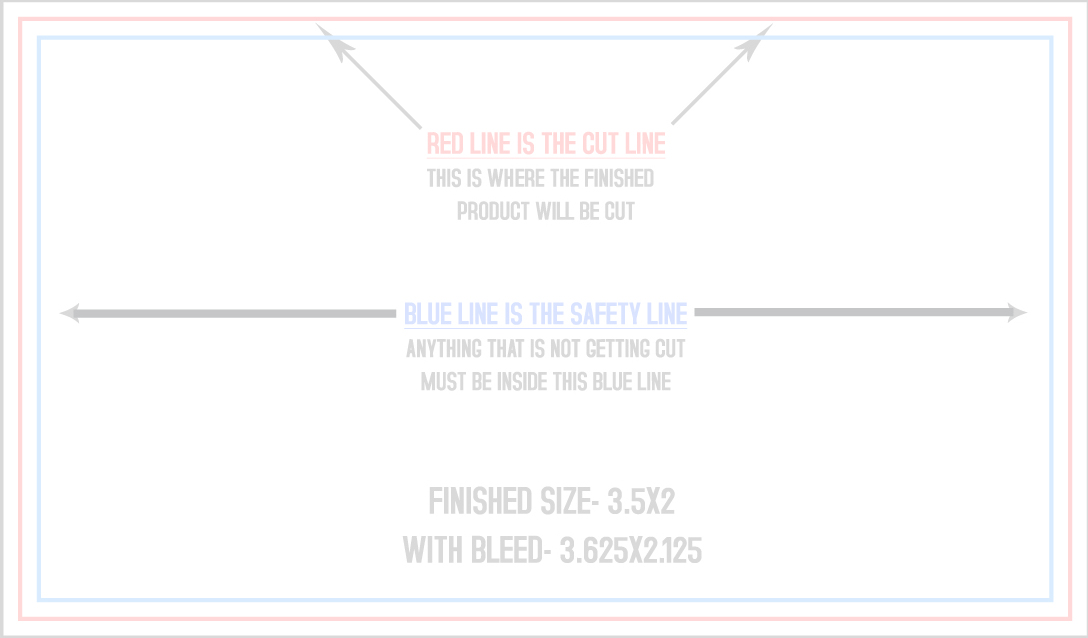
The standard final cut size for a business card is 3.5″ x 2″. To achieve a clean, professional edge-to-edge finish, your design file must include a Bleed.
-
The Concept: You must extend your background design 0.125″ beyond the final cut line.
-
The File Size: For a standard 3.5″ x 2″ card, your upload file should be 3.625″ x 2.125″.
-
The Safety Zone: Keep all text and logos at least 0.125″ inside the cutting border. This ensures your content remains perfectly centered, regardless of the paper thickness chosen.
2. Understanding the Color Trinity: RGB, CMYK, & Pantone
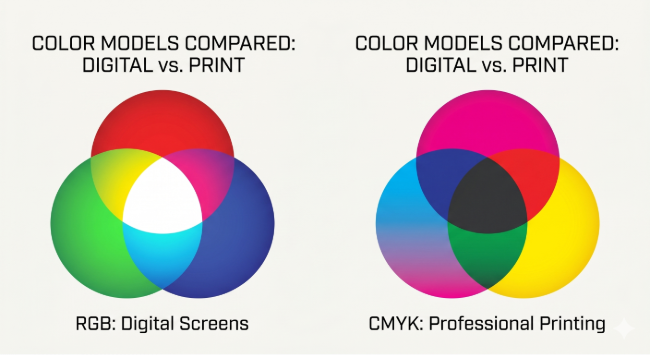
Maintaining color accuracy across different mediums is one of the biggest challenges in branding. The most common issue in professional printing is a “Color Shift.” This happens when files are designed in the “light-based” language of screens instead of the “ink-based” language of presses.
Mastering the CMYK Color Space
-
RGB (Red, Green, Blue): Used for digital cameras, monitors, and scanners. It relies on light to create vibrance.
-
CMYK (Cyan, Magenta, Yellow, Black): The industry standard for professional printing. It relies on physical ink layered on paper.
Why it matters: Many vibrant neon and deep blue shades visible on your monitor are “out of gamut” for physical ink. To guarantee the most accurate color representation, always set your design software to CMYK mode before you begin your project.
Pantone: The Standard-Bearer for Consistency
Pantone is used extensively in branding to ensure a company’s colors are uniform whether they appear on a business card or a massive billboard. It uses pre-mixed “Spot Colors” to achieve exact matches that CMYK cannot always reach.
| Feature | RGB | CMYK | Pantone (PMS) |
|---|---|---|---|
| Primary Use | Digital Screens | Standard Printing | Elite Branding |
| How it Works | Additive Light | Subtractive Ink | Pre-Mixed “Spot” Ink |
| Color Range | Millions (Ultra-Vivid) | Limited (Standard) | Thousands (Highly Specific) |
| Consistency | Varies by Device | Varies by Print Run | Identical every time |
3. The Conversion Challenge: A Critical Warning
Converting between these color systems is not always a 1:1 science, and it can lead to significant changes in your design’s appearance.
-
The Screen-to-Print Gap: When you convert RGB digital colors to CMYK for printing, the result often appears muted or “flat.”
-
The Pantone Paradox: Translating Pantone colors to CMYK can result in a loss of color fidelity. Because not all Pantone colors have a direct CMYK equivalent, some vibrant shades may shift significantly.
How to mitigate these challenges: Professional design software like Adobe Photoshop and Illustrator offer built-in tools to help manage these transitions. If your brand relies on a specific color match, we recommend using Pantone Color Manager or consulting with our team during the design phase.
4. Resolution & Clarity
To maintain the sharp, crisp edges required for premium paper stocks, ensure all non-vector images are at least 300 DPI. Low-resolution files will appear blurry or “pixelated” when transferred to a high-density paper stock.
Final Check: Zero-Error Assurance
Still not sure if your design meets the technical requirements? Before you submit your order, use our Professional Preflight Tool to instantly analyze your artwork for potential issues.